 Switchboard
Every ticket to the right engineer.
Switchboard reads your unassigned queue and gets each ticket to the right person — matched by specialism, who's actually free, and current load. Keep a human in the loop, or let it assign automatically under your rules. It runs on the helpdesk Nexus is already connected to, so there's nothing new to plug in.
A private add-on, included with every Enterprise licence. It stays hidden in Nexus until your key includes it — and even then it's off until you switch it on, so nothing changes on your board until you're ready.

Four steps, every time.
Deterministic and explainable — no black box. The same inputs always reach the same engineer, and you can see exactly why.
The four routing steps
Classify
Read the ticket — subject and body, quoted history and signatures stripped — and tag its area (POS, M365, network, access, on-site and more) plus a P1/P2/P3 priority from the wording.
Match specialism
Find the engineers whose primary skill is that area, then their secondary specialists — the right person before the nearest person.
Check availability
Cross-reference your helpdesk's live agent presence: online beats away, on-site and at-capacity engineers are skipped.
Balance the load
Among equally-good options the least-loaded wins, with a fairness rotation — or it holds for the team when nobody's free.
Shows its working.
Every recommendation comes with a full trace — which specialists it considered, who was online, why it landed where it did. When it holds a ticket, it tells you that too, so nothing falls silently between the cracks.
Build the team once — names, specialisms, capacity, who can go on-site, who's hands-off — and Switchboard does the rest against the live board.
Not just a console — a board panel.
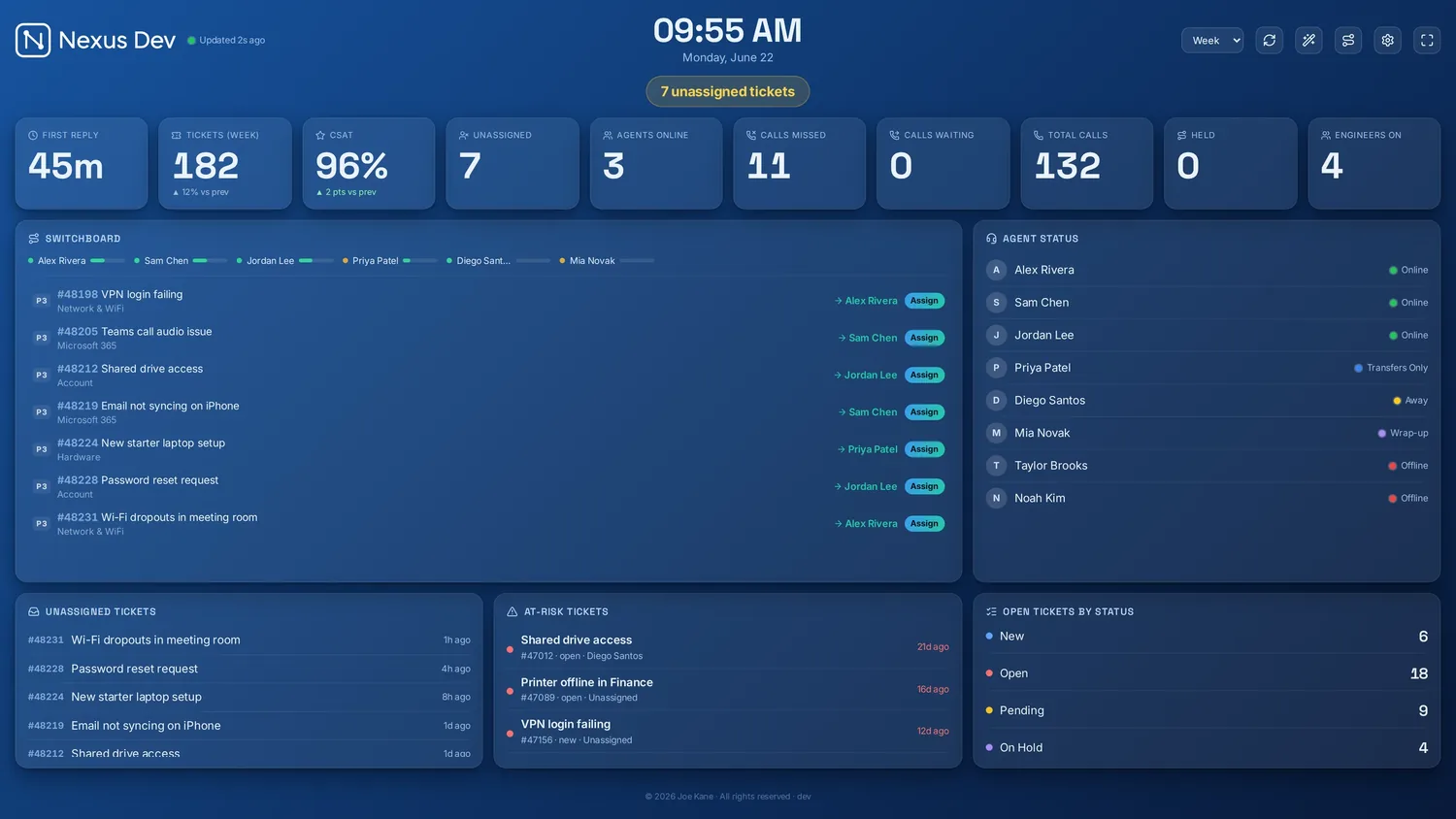
Switchboard now lives on the wallboard itself. The live feed panel streams every incoming ticket and the engineer it's headed to — new arrivals slide in, the queue clears with a flourish — so the whole team can watch routing happen across the room.
Recommend, or just do it.
Three modes — off, manual (it recommends, you click Assign) and automatic (it writes the assignment straight back to your helpdesk). Start with a dry run that records exactly what it would do, watch it for a day, then go live. It never re-assigns a ticket a human already touched.

Specialisms, from what they actually solve.
Not sure who's best at what? Switchboard reads each engineer's recently-solved tickets and proposes their specialisms — with the evidence in plain English. You review and apply; it never overwrites your roster on its own. No AI key? It generates a prompt for your own ChatGPT or Claude and safely decodes the code it gives back.

Smart routing, your rules.
Specialism-first
Primary and secondary skills per engineer, so POS goes to your POS people and M365 to the M365 ones — automatically.
Availability-aware
Uses your helpdesk's live agent presence. Online beats away; on-site and at-capacity engineers sit out until they're free.
Load balanced & fair
The least-loaded of the right people wins, with a rotation so the same name isn't always first off the rank.
On-site to field engineers
Installs and site visits only ever go to engineers who can actually attend — never a desk-only specialist.
Holds, never drops
When nobody eligible is free, the ticket is held and flagged for the team rather than forced onto the wrong person.
Quick to set up
Built on the data Nexus already reads — Zendesk, Freshdesk, Freshservice, Jira SM, HaloPSA, SuperOps, NinjaOne, ConnectWise PSA, Zoho Desk, Help Scout or Front. No new connector, and one click imports your agents as a starting roster — you just add their specialisms.
Automatic, on your terms
Flip from recommend to auto-assign when you're ready. Dry-run first, cap how many it does, hold your P1s, keep it to business hours — and watch every move in the audit trail.
AI for the hard ones
Opt-in. When the keyword classifier is unsure, your own AI provider picks the engineer from the eligible team — and it always falls back to the deterministic engine, so AI never blocks a routing.
Learns specialisms
Reads who resolves what from your solved history and proposes each engineer's primary and secondary skills — with the evidence. You review and apply — proposals never touch your roster until you say so.
Built, and finding its feet.
Switchboard is in public beta while we tune it against real teams. It's a private add-on — included with every Enterprise licence — and honest about being early. It's manual by default: it recommends, you assign. Turn on automatic mode when you trust it, behind dry-run and the safety rails.
New to Nexus? See how it compares, browse the guides, or try the live demo.