 Nexus
NexusGuides → Keeping a remote support team aligned with a shared wallboard
Keeping a remote support team aligned with a shared wallboard
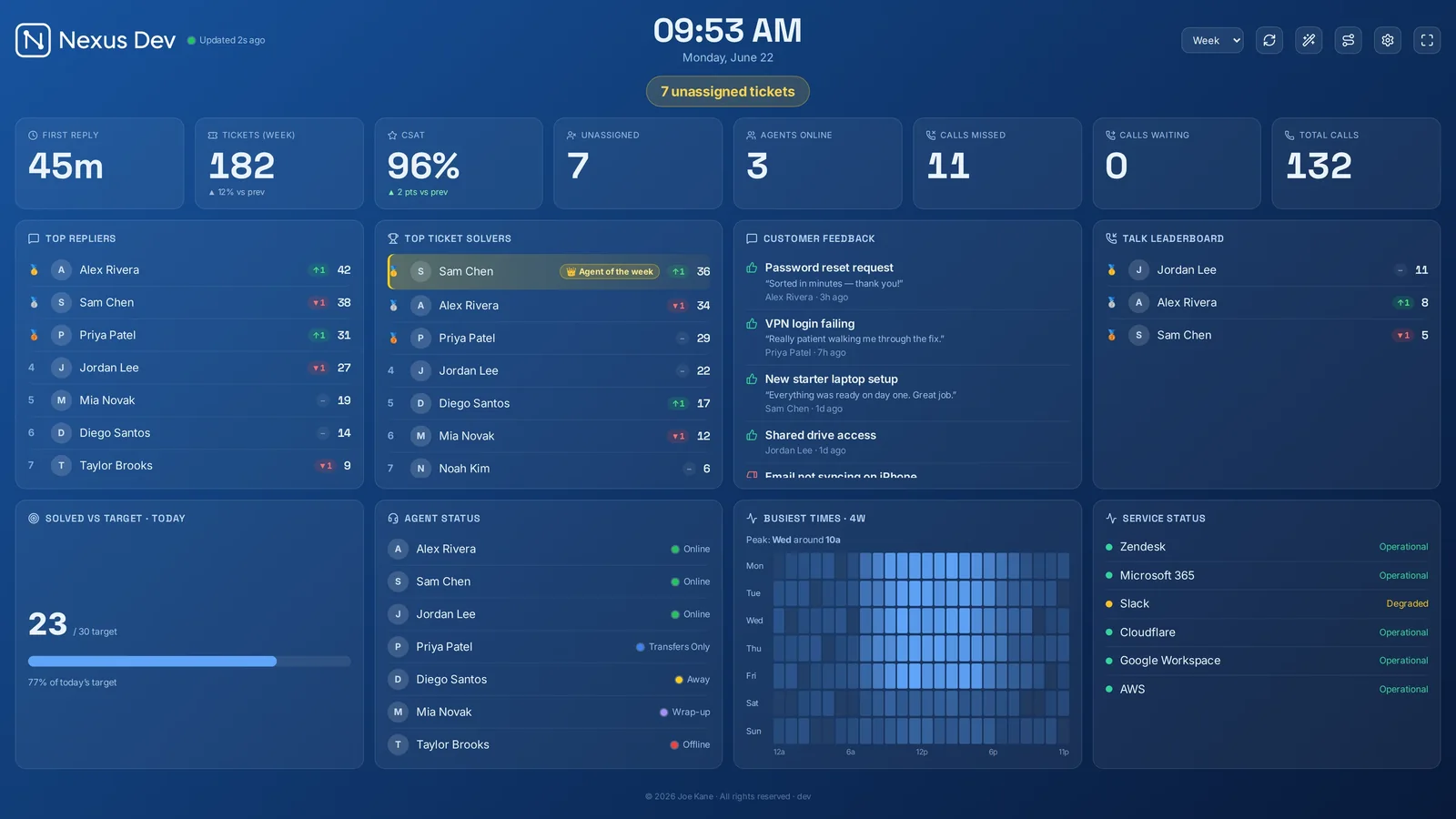
When your support team is spread across kitchens, spare rooms and different time zones, the thing you lose first is the shared sense of "where are we right now?" A live wallboard, open on everyone's screen, puts that back — a single source of truth nobody has to ask for, without anyone hovering over a queue report. Here's how a shared board keeps a remote or hybrid desk aligned, and how to set one up that people actually keep open.
What a co-located team gets for free — and a remote one doesn't
In a shared office, alignment is ambient. You hear the phones, you see who's heads-down, someone says "that one's about to breach" across the room. Remote, all of that disappears. The queue still moves, SLAs still tick, but nobody has the room-level picture any more — so people either over-communicate in chat or quietly drift out of sync. A live board rebuilds that ambient awareness on a screen everyone shares: the same numbers, updating in real time, for the person on the early shift and the one logging on three hours later.
A single source of truth, not another status meeting
The point of a shared board is that nobody has to assemble the picture by hand. Instead of a morning stand-up where someone reads out yesterday's figures, the board shows today's as they happen — open and unassigned tickets, SLA breach countdowns sliding from amber to red, first response times, CSAT, solved-versus-target for the day. When the queue is the same object everyone is looking at, conversations get shorter and more concrete: "I'll take the two unassigned, you grab the amber one" instead of "what's the queue like?" It also means your async messages reference a thing everyone can see, rather than a snapshot that's already stale by the time it's read.
Presence and queue visibility without micromanaging
There's a real tension with remote teams: leaders want visibility, and nobody wants to feel watched. A good board threads that needle because it shows work, not people's screens. An agent leaderboard with streaks and an Agent of the Week celebrates output and makes the shift feel shared, rather than tracking minutes. The queue and SLA countdowns make the priorities obvious, so a team member can self-direct to the most at-risk ticket without a manager assigning it. The signal is "here's what needs us next," not "we're checking up on you" — which is the difference between a board people leave open and one they close.
Honest caveat: a wallboard shows the queue and outcomes, not what anyone is doing. Nexus has no activity tracker and no screen monitoring, by design — it's a board for the work, not a surveillance tool. There is an optional staff clock people tap themselves in and out of — in the office, on site or remote — but that's voluntary presence people set for themselves, not tracking; the board watches nobody. If you need a full rota or availability, that lives in your help desk or chat tool, where it belongs.
How each person actually opens it
Remote teams need the board to meet people where they are, and that's mostly a browser tab. Nexus runs on your own server, and everyone points at the same instance:
- In a browser — the most common setup. Open the board's URL, leave it in a pinned tab on a second monitor, and it stays live all shift.
- The thin desktop app — for someone who wants the board in its own window rather than competing with forty tabs.
- The mobile app — for a team lead away from their desk, or anyone who wants a glance at the queue from their phone between tasks.
- A shared TV or kiosk — if part of the team is still in an office, TV/kiosk mode puts the same board on the wall there, so on-site and remote people are literally looking at the same thing.
Because the board reads your ticketing provider — Zendesk, Freshdesk, Freshservice, Jira Service Management, HaloPSA, SuperOps, NinjaOne, ConnectWise PSA, Zoho Desk, Help Scout or Front — and your monitoring vendor in a separate panel, everyone sees the same connected view regardless of how they opened it. (If your team also fields phone support through Zendesk Talk, the live call queue shows calls waiting and longest hold alongside the tickets.)
Self-hosted: getting the board to a distributed team securely
The trade-off with a self-hosted board is that you're the one deciding how remote people reach it — which is also the upside, because access stays entirely under your control and your ticket data never leaves your infrastructure. There's no third-party cloud holding your queue. In practice you put the board behind whatever you already use to give the team access to internal tools:
- Over a VPN — the board lives on your network and remote staff connect to it the same way they reach everything else internal.
- Behind SSO and a reverse proxy — front the instance with your identity provider so only your people, signed in, can load the board.
- On a private network or tunnel — for smaller teams, a private hostname or a tunnel to the host keeps it off the public internet entirely.
The right answer depends on your stack, but the principle is the same: you own the door. Our security page walks through the actual mechanisms — what the app talks to, where credentials are stored, and the small, opt-out telemetry it sends. If you're still weighing the model itself, the guide on self-hosted versus cloud wallboards lays out where each one genuinely wins for a distributed team.
What to show a distributed team
A remote team's board has a slightly different job from an on-site TV: it's read on individual monitors, often glanced at between tickets, so it should make priorities and shared goals unmistakable. A sensible default:
- SLA breach countdowns front and centre — the amber-to-red shift is the clearest "act now" signal you can give a self-directing team.
- Open and unassigned queue so anyone can pick up what's nobody's yet without being told to.
- A KPI strip — first response, solved-versus-target today, CSAT — to keep the shared goal visible all shift.
- The agent leaderboard with streaks to give a scattered team a sense of being on the same shift together.
- A scheduled Slack, Teams or Discord digest, plus optional AI daily summaries, so the picture reaches people who've stepped away from the board — alignment that follows the team into the tools they already live in.
If you run multiple desks or time zones, multiple dashboards with rotation let each one surface what's relevant to whoever's on. You can see the full set of tiles, themes and panels on the features page, and there's a zero-setup live demo with sample data — no account, no card — so you can try the layout on your own screen before pointing it at your help desk. Nexus is flat-priced at £29–£119 a month for unlimited screens and agents, which means every remote team member can keep the board open without it costing you per seat.
See it live
Nexus puts SLA countdowns, the live queue, CSAT and leaderboards on a self-hosted board — try the demo (no account, no card), then start a 14-day free trial on your own data, billed only if you keep it.