 Nexus
Features → Freshdesk wallboard
The self-hosted Freshdesk wallboard.
Nexus is a self-hosted Freshdesk wallboard: it reads Freshdesk directly and puts your live tickets, SLA countdowns, CSAT and leaderboards on the office TV, a desk or a phone. It runs on your own server, or a private instance we host for you, for a flat £29–£119 a month with unlimited agents and screens.
14 days of Pro on your own Freshdesk data. Just your email, no card.
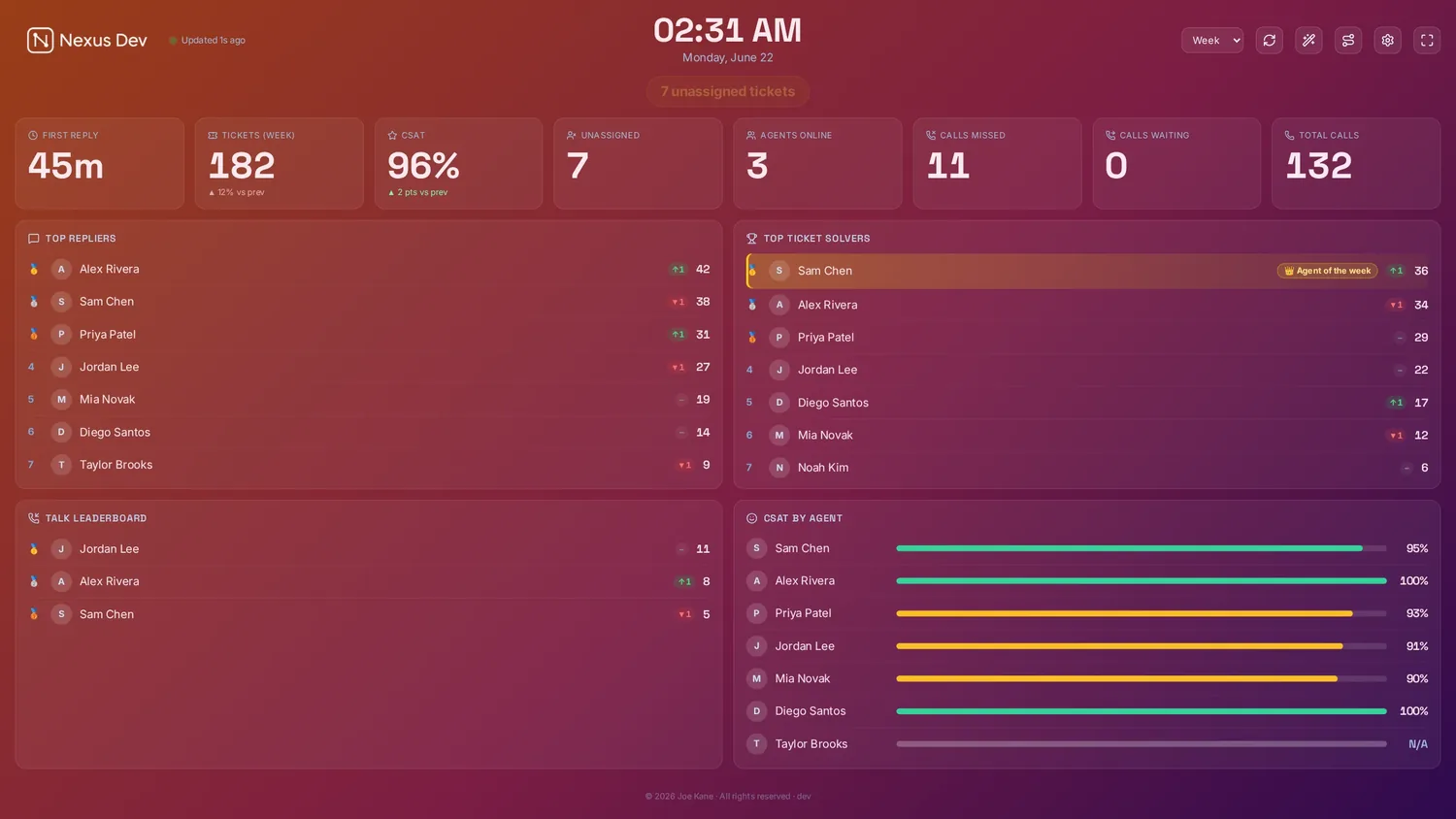
What does the Freshdesk wallboard show?
Tickets & SLAs
Open, pending, overdue and resolved across your groups and views, with first-response and resolution SLAs counting down. They turn amber then red before they breach, so the floor acts in time.
CSAT & leaderboards
Customer satisfaction pulled from Freshdesk's satisfaction ratings, per-agent CSAT and resolved-vs-target, with leaderboards, movement, streaks and Agent of the Week to keep the team motivated.
Agent presence, first reply & heatmap
Who's available right now from Freshdesk's ticket availability, average first-reply time, per-company client counts and a created-volume heatmap that shows when the day gets busy.
How do you put Freshdesk on a TV? Three steps.
- Install Nexus
Run the desktop app or the Docker server on hardware you already own. Your helpdesk data goes straight to your server. Nothing proxies through us.
- Enter your domain & API key
The first-run wizard asks for your Freshdesk domain (the yourco in
yourco.freshdesk.com) and a Freshdesk API key from Profile settings → Your API Key. Nexus reads Freshdesk directly; your ticket data never leaves your server. - Pick panels & cast
Choose your panels and theme, then send the board to the office TV, a desk, or a phone.
Full walkthrough in the documentation.
Your Freshdesk data stays yours
Nexus calls the Freshdesk API straight from your server using your own API key. Ticket and CSAT data never lands in someone else's cloud. There's no middleman to trust.
Flat, honest pricing
£29–£119/month flat. Unlimited screens and agents, however many Freshdesk groups you watch. No per-seat climb as the team grows.
Built for the wall
4K scaling, rotation, themes, a ticker and a full-screen SLA war-room, all designed to live on the office TV all day and keep the breaching tickets impossible to miss.
Freshdesk wallboard FAQ.
What do I need to connect Freshdesk?
Two things: your Freshdesk domain (the yourco part of yourco.freshdesk.com) and a Freshdesk API key, found under Profile settings → Your API Key once you are signed in. Paste both into the first-run wizard and Nexus reads your tickets, SLAs and CSAT directly.
Can Nexus show a live call queue from Freshdesk?
No, and we would rather be honest than imply it. A live phone queue comes from Freshcaller, a separate Freshworks product with its own API, so a Freshdesk board does not include calls waiting or longest wait. The live call queue is a Zendesk Talk feature. Your Freshdesk board focuses on tickets, SLAs, CSAT, agent presence, first reply and the created-volume heatmap.
Which Freshdesk metrics appear on the board?
Tickets with their SLA countdowns, CSAT from Freshdesk's satisfaction ratings, agent presence from ticket availability, average first-reply time, a created-volume heatmap and per-company client counts. Reopen and first-contact-resolution history are not exposed by the Freshdesk API, so the board does not invent them.
Can I put the Freshdesk wallboard on a TV?
Yes. Plug a mini-PC, an old laptop, an Apple TV or a Chromecast into the TV, or use its own browser, and open the board full-screen. 4K scaling, panel rotation, themes and kiosk/lock mode mean it runs all day and comes back by itself after a reboot. It also casts to a desk or a phone.
Run a different desk?
Related guides
All guidesSee your Freshdesk on the wall.
Point a free 14-day Pro trial at your own Freshdesk data. Just your email, no card. Or open the live demo first: it fills the board with realistic sample data in about 30 seconds. Plans start at £29/month flat.