 Nexus
NexusGuides → What is a wallboard? A plain-English guide for support teams
What is a wallboard? A plain-English guide for support teams
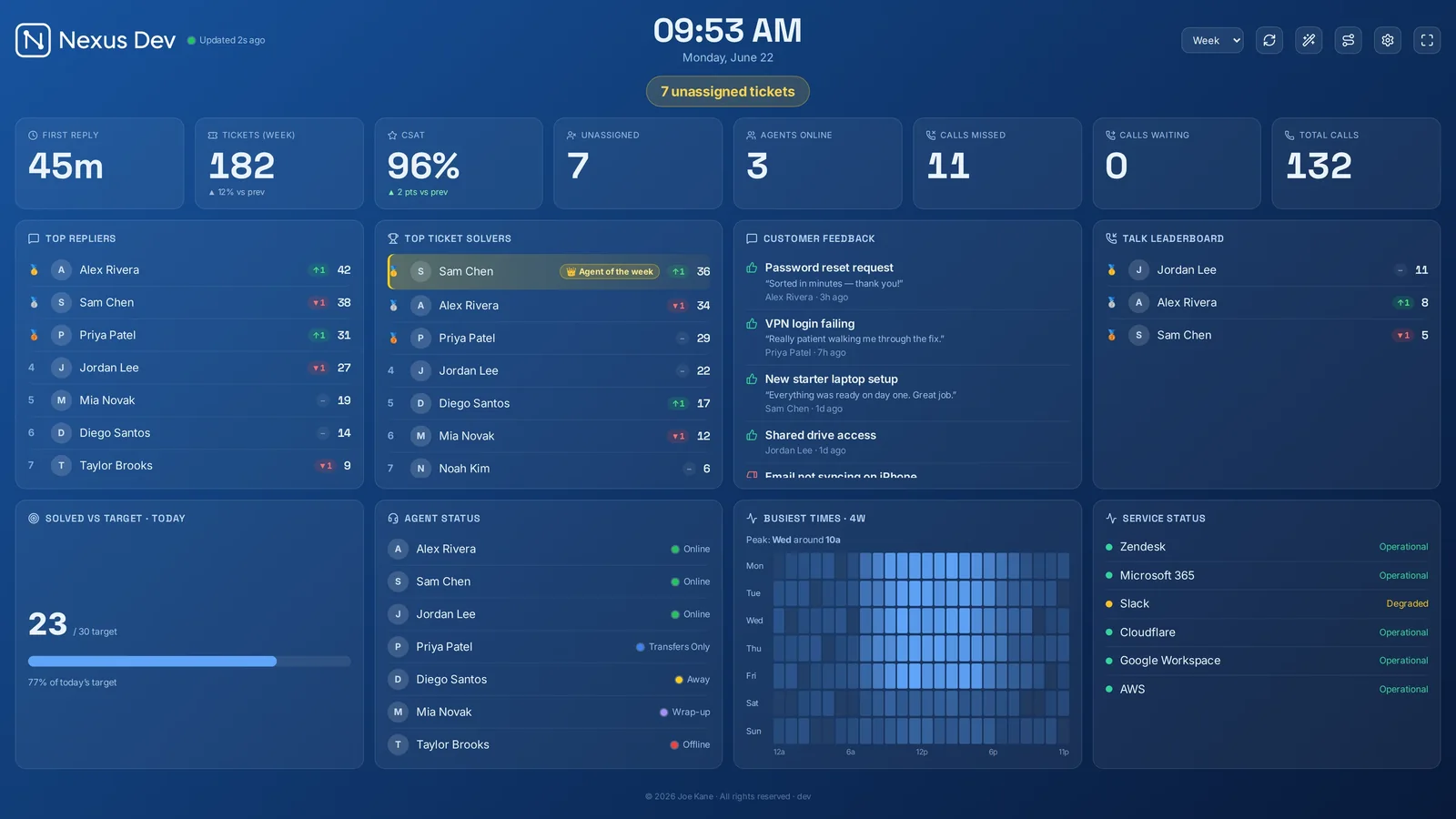
A wallboard is a single screen — usually a TV on the office wall — that shows a support team's most important live numbers, large enough to read from across the room. Its whole purpose is shared, at-a-glance awareness: anyone can look up and know, without asking, whether right now is under control.
What a wallboard actually is
Strip away the jargon and a wallboard is a public scoreboard for live work. It pulls a handful of real-time figures from your help desk, phone system or monitoring tools and displays them big, bright and constantly refreshed. Calls waiting climbs and someone available picks up. A ticket's SLA countdown turns from amber to red and the room rallies to it before it breaches. Nobody has to open a console or run a query — the information is simply there, in everyone's eyeline.
The word comes from call centres, where a literal board on the wall once showed how many callers were holding. The idea has spread well beyond phones: any team that handles a live, shared queue — support tickets, chats, alerts, incidents — benefits from one surface everyone reads the same way at the same time.
Wallboard vs dashboard vs report
These three words get used interchangeably, but they answer different questions and belong in different places.
- A wallboard answers "what's happening right now?" It's glanceable, public, refreshed every few seconds, and carries only the handful of numbers a team can act on this minute. You read it from ten feet away.
- A dashboard answers "how am I doing?" It's personal and interactive — filters, date ranges, drill-downs — read up close on your own screen. It can hold far more detail because you're studying it, not glancing at it.
- A report answers "what happened, and what should we change?" It's retrospective: month-end volumes, trends, cost per ticket, forecast accuracy. You read it once and make a decision for next quarter.
The common mistake is treating a wallboard like a dashboard and filling it with forty tiles. The skill is subtraction. A good wall carries five or six numbers people can act on; everything else lives in a dashboard or a report. Our guide to which metrics belong on the wall goes deeper on where to draw that line — the short version is that a metric earns its place only if seeing it change makes someone do something in the next few minutes.
Who uses wallboards
Anyone running a live, shared queue, but a few teams lean on them especially hard:
- Support desks. Open and unassigned tickets, SLA breach countdowns, first-response time, CSAT and a solved-vs-target bar — so the team can see the backlog and self-assign before anything slips.
- Call centres. Calls waiting, longest hold, service level and agent status, refreshed every few seconds. This is the original use case, and it's where seconds genuinely matter — there's more in our call centre wallboard guide.
- IT and MSP NOCs. A network operations centre wants device health, alerts and outages on the wall alongside the ticket queue, so the engineer on shift spots a problem the moment it appears rather than when a customer rings in.
What unites them is shift work and shared responsibility. When several people own a queue together, a wallboard removes the need to keep asking "how are we doing?" — the answer is always on the wall.
Why teams put one on the wall
Three benefits come up again and again, and they reinforce each other.
- Shared awareness. Everyone sees the same picture at the same time. A supervisor can tell whether the floor is healthy in two seconds from across the room, and the team doesn't need a status meeting to find out the queue is building.
- Faster reactions. A breach countdown turning red, a spike in calls waiting, an alert from a monitoring tool — the wall surfaces these the instant they happen, so the response is immediate rather than after the fact.
- Motivation. A visible leaderboard, streaks and an "Agent of the Week" add a bit of friendly competition and recognition. Pair it with CSAT so "go fast" never quietly becomes the only goal — quality stays on the board too.
The two-second test. If someone across the room can't read a number and tell whether it's good or bad in two seconds, it's too detailed for the wall. Move it to a dashboard and put something glanceable in its place.
What goes on a good wallboard
It varies by team, but most strong walls share a shape: a strip of live KPI tiles across the top, the queue with SLA breach countdowns below, an agent leaderboard, and a progress bar towards the day's target. Use colour sparingly and consistently — green is fine, amber means "watch this", red means "act now". If you have more to show than fits cleanly, rotate panels on a timer rather than shrinking everything, and run the whole thing full-screen so it survives a reboot.
How Nexus does it
Nexus is a self-hosted, real-time support wallboard. You run it on your own server from a public Docker image, and the thin desktop, mobile and Zendesk apps point at that server — so your ticket data and connector credentials stay on your infrastructure, not a third party's. It connects to one ticketing or PSA provider at a time (Zendesk, Freshdesk, Freshservice, Jira Service Management, HaloPSA, SuperOps, NinjaOne, ConnectWise PSA, Zoho Desk, Help Scout or Front) and, in a separate slot, to your monitoring or RMM tool, with one panel per connected vendor.
On the board you get live KPI tiles, SLA breach countdowns, agent leaderboards with streaks and Agent of the Week, CSAT, ticket and people panels, trends and heatmaps, and a per-tool monitoring panel. A live call queue is available for Zendesk via Zendesk Talk. There's optional AI daily summaries, a scheduled Slack, Teams or Discord digest, eleven themes and six looks, and a TV/kiosk mode with multiple dashboards on rotation. Switchboard, an optional auto-routing add-on, is in public beta and included with Enterprise.
Plans are flat — Starter £29, Pro £59 and Enterprise £119 a month across the range — with unlimited screens and agents, self-hosted, cancel anytime. The quickest way to see what a wallboard feels like is the zero-setup demo, which shows the board with sample data and needs no account or card; the full feature list covers everything in detail.
See it live
Nexus puts SLA countdowns, the live queue, CSAT and leaderboards on a self-hosted board — try the demo (no account, no card), then start a 14-day free trial on your own data, billed only if you keep it.